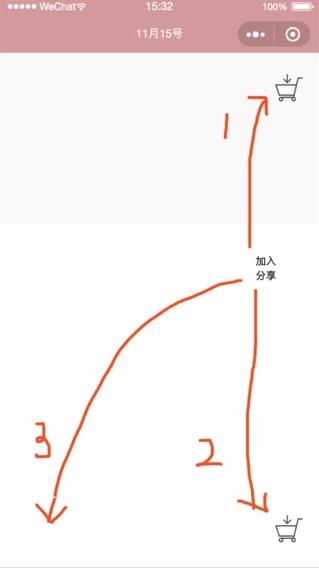

微信小程序加入購物車動畫的實現(向上、向下)
場景描述:一般情況下,加入購物車的動畫效果都會是上圖的3的路線,在這篇文章里,我們來實現1和2路線的加入購物車的動效(3路線的動畫效果網上有很多,具體可以參考這篇文章來實現: www.cnblogs.com/greengage/p… )。 實現方式:不管是上圖中的哪一種效果,我們都是用CSS3里的cubic-bezier(三次貝塞爾曲線)來實現的。具體什么是三次貝塞爾曲線,可以參考這篇文章: www.bbsmax.com/A/RnJWwpbRJ… #實現流程: 1、獲取屏幕的高度大小wx.getSystemInfo({// 獲取頁面的有關信息
success: function (res) {
wx.setStorageSync('systemInfo', res) var ww = res.windowWidth; var hh = res.windowHeight;
that.globalData.ww = ww;
that.globalData.hh = hh;
}
});2、獲取點擊的位置(購物車的位置我們定為最上方或者最下方),定義移動距離/*加入購物車動效*/
_flyToCartEffect: function (events) { //獲得當前點擊的位置,距離可視區域左上角
var touches = events.touches[0]; var diff = { x: '25px', y: app.globalData.hh -touches.clientY-40 + 'px'//向下
// y: 25- touches.clientY + 'px'//向上
},
style = 'display: block;-webkit-transform:translate(' + diff.x + ',' + diff.y + ') rotate(350deg) scale(0)'; //移動距離
this.setData({ isFly: true, translateStyle: style
}); var that = this;
setTimeout(() => {
that.setData({ isFly: false, translateStyle: '-webkit-transform: none;', //恢復到最初狀態
isShake: true,
});
setTimeout(() => { var counts = that.data.cartTotalCounts + that.data.productCounts;
that.setData({ isShake: false, cartTotalCounts: counts
});
}, 200);
}, 1000);
},3、在css里調用beizer函數.fiexd-cart.animate{ animation: aCartScale 200ms cubic-bezier(.17,.67,.83,.67); animation-fill-mode: backwards;
}aCartScale是,在曲線的最后,實現了個購物車抖動的動畫@-webkit-keyframes aCartScale{
0%{ -webkit-transform: scale(1.1);
}
100% { -webkit-transform: scale(1);
}
}至此,流程全部介紹完畢,下面是全部的代碼(里面可能有一些沒用的css樣式代碼,讀者可以自行根據需要刪除): js代碼:var app = getApp();
Page({ /**
* 頁面的初始數據
*/
data: { isFly:false
}, /*添加到購物車*/
onAddingToCartTap: function (events) { //防止快速點擊
if (this.data.isFly) { return;
} this._flyToCartEffect(events);
}, /*加入購物車動效*/
_flyToCartEffect: function (events) { //獲得當前點擊的位置,距離可視區域左上角
var touches = events.touches[0]; var diff = { x: '25px', y: app.globalData.hh -touches.clientY-40 + 'px'//向下
// y: 25- touches.clientY + 'px'//向上
},
style = 'display: block;-webkit-transform:translate(' + diff.x + ',' + diff.y + ') rotate(350deg) scale(0)'; //移動距離
this.setData({ isFly: true, translateStyle: style
}); var that = this;
setTimeout(() => {
that.setData({ isFly: false, translateStyle: '-webkit-transform: none;', //恢復到最初狀態
isShake: true,
});
setTimeout(() => { var counts = that.data.cartTotalCounts + that.data.productCounts;
that.setData({ isShake: false, cartTotalCounts: counts
});
}, 200);
}, 1000);
},
})wxml代碼:<view class="container detail-container">
<view class="fixed-btns-box" bindtap="onCartTap">
<view class="fiexd-cart {{isShake?'animate':''}}">
<image src="../../imgs/icon/cart@top.png"></image>
<view wx:if="{{cartTotalCounts>0}}">{{cartTotalCounts}}</view>
</view>
</view>
<view
style="position: fixed;right: 50rpx;bottom:100rpx;width: 100rpx;"
class="add-cart-btn {{product.stock==0?'disabled':''}}" bindtap="onAddingToCartTap">
<text style="width: 360rpx">加入分享</text>
<image class="cart-icon" src="../../imgs/icon/cart.png"></image>
<image id="small-top-img" class="small-top-img {{isFly?'animate':''}}" src="https://timgsa.baidu.com/timg?image&quality=80&size=b9999_10000&sec=1575871576&di=dda9d07660c88bea6553c3279b0a8cf0&imgtype=jpg&er=1&src=http%3A%2F%2Fpic.pc6.com%2Fup%2F2011-9%2F2011926155953.jpg"
mode="aspectFill" style="{{translateStyle}}"></image>
</view>
<view class="fixed-btns-box2" bindtap="onCartTap">
<view class="fiexd-cart {{isShake?'animate':''}}">
<image src="../../imgs/icon/cart@top.png"></image>
<view wx:if="{{cartTotalCounts>0}}">{{cartTotalCounts}}</view>
</view>
</view></view>wxss代碼:.detail-container { background-color:#F9F9F9}.detail-header-box,.detail-bottom-box{ background-color: #fff;
}.detail-topic-img{ display: flex; justify-content: center;
}.detail-topic-img image{ width: 100%;
}.fixed-btns-box{ position: fixed; top:50rpx; right:12px; width: 80rpx;
}.fixed-btns-box2{ position: fixed; right:12px; width: 80rpx; bottom: 50rpx;
}.fiexd-cart image{ height: 64rpx; width: 64rpx;
}.fiexd-cart view{ font-size: 24rpx; background-color: #AB956D; color: white; position: absolute; right: 64rpx; top: 0rpx; height: 36rpx; width: 36rpx; line-height: 36rpx; border-radius: 36rpx; text-align: center;
}.fiexd-cart.animate{ animation: aCartScale 200ms cubic-bezier(.17,.67,.83,.67); animation-fill-mode: backwards;
}
@-webkit-keyframes aCartScale{
  0%{    -webkit-transform: scale(1.1);
  }
  100% {    -webkit-transform: scale(1);
  }
}.product-counts,.add-cart-btn{ height: 100%; display: flex; font-size: 24rpx; align-items: center; justify-content: center;
}.product-counts{ width: 50%;
}.add-cart-btn{ position: relative; flex: 1;
}.add-cart-btn:active{ color: #fff;
}.add-cart-btn.disabled{ color: #D5D5DB;
}.small-top-img{ height: 160rpx; width: 160rpx; right:6rpx; position: absolute; opacity: 0;
}.small-top-img.animate{ opacity: 1; -webkit-transition:all 1000ms cubic-bezier(0.175, 0.885, 0.32, 1.275);
}.add-cart-btn .cart-icon{ margin-left: 40rpx; height: 32rpx; width: 32rpx;
}.disabled{ pointer-events: none;
} |